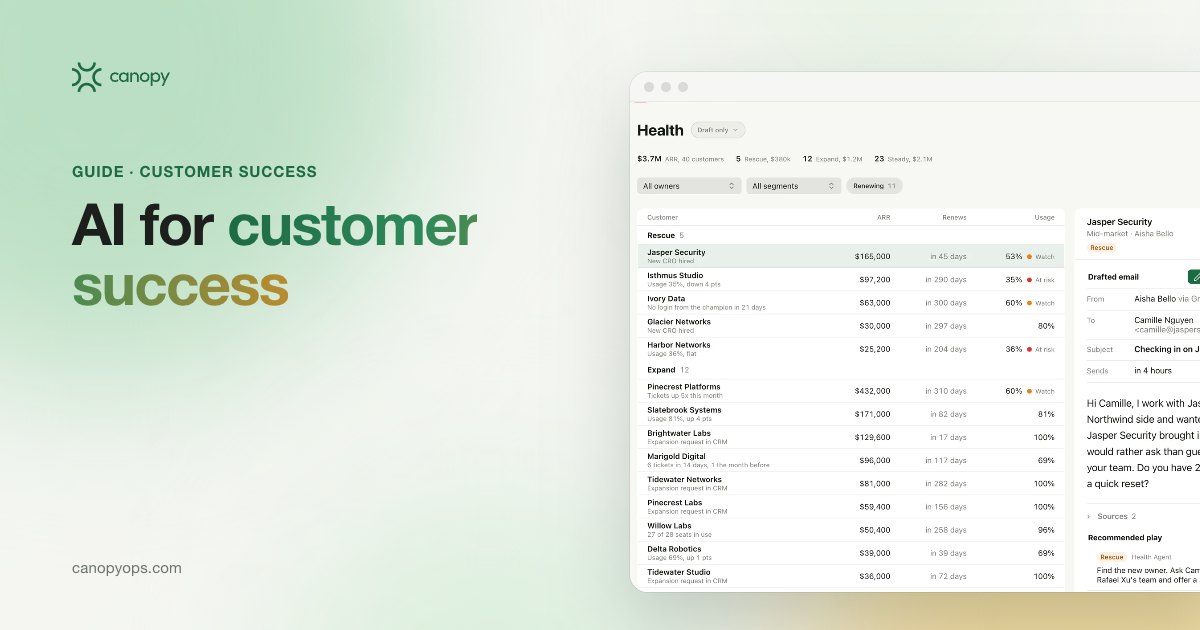
AI for customer success puts product usage, support and relationship signals on the CRM account record, scores account health, and flags churn risk and expansion to the CSM and AE who own the account. Agents draft the save plan, renewal prep or QBR deck. In Canopy's Customers workspace, drafts stay on Draft only until the CSM sends them.
Key takeaways on AI for customer success
- AI for customer success works best when product usage shows up on the CRM account record every morning, where CSMs and AEs already work.
- SaaS Capital's 2025 survey of more than 1,000 private B2B SaaS companies puts median net revenue retention at 101% and median gross revenue retention at 91%, so a few points of churn decide whether the existing base grows at all.
- A customer health score earns a CSM's trust when every point can be explained and the model is checked against the accounts that churned.
- Canopy's Customers workspace runs on Draft only by default: agents prepare the outreach or the renewal plan, and the CSM decides whether and when to send.
What AI for customer success does inside the CRM
AI for customer success takes over the reading and preparation that CS teams already do by hand: checking product usage, judging account health, spotting churn risk and expansion early, and getting ready for renewals. Agents add coverage. A CSM with a large book tends to review the accounts that are loudest that week. An agent reads every account every day and surfaces the ones whose numbers moved, with the reason attached.
Customer success work splits cleanly between agents and people. Agents read the data and write the first draft. People make the calls: the CSM decides whether a risk is real and what to say, the AE owns the expansion conversation, and the CS leader decides how the health model is weighted. I'd be wary of any tool that blurs that line, because a customer who gets a tone-deaf automated check-in during a rough quarter tends to remember it at renewal.
Customer success AI belongs in the CRM the rest of the revenue team shares. Most revenue teams already run a CRM such as HubSpot or Salesforce that sales, marketing and finance all use. Putting usage and health in that CRM means the AE sees the same risk the CSM sees, and the renewal forecast reads from the same record. A separate dashboard that only the CS team opens leaves everyone else guessing.
Why retention benchmarks make customer success a revenue job
SaaS Capital's 2025 retention survey puts the median B2B SaaS company at 101% net revenue retention (NRR) and 91% gross revenue retention (GRR). The survey is SaaS Capital's 14th annual edition, with more than 1,000 private B2B SaaS companies responding in the first quarter of 2025. A median NRR of 101% means the median company's existing customers produced about one point more revenue over the year once churn, downgrades and expansion netted out. Every renewal the CS team saves, and every seat expansion it routes to an AE, moves that number directly.
SaaS Capital also links retention to growth. In the 2025 data, companies with NRR of 110% or more grew faster than the 24% median growth rate, companies below 100% grew slower, and moving from the 100 to 110% NRR band into the 110 to 120% band was associated with 9 percentage points more growth. SaaS Capital calls 90% GRR the "table stakes" benchmark. The 2025 KeyBanc Capital Markets and Sapphire Ventures SaaS Survey describes the same pattern for private SaaS companies: gross retention near 90% and net retention above 100%. Expansion carries a large share of new revenue as well. Ebsta's 2025 GTM Benchmarks digest, which is vendor data, found that 52% of new revenue in 2024 came from existing accounts.
Retention benchmarks by contract type and deal size
Contract structure and deal size shift the retention benchmark. Among contract lengths, multi-year contracts retain best in SaaS Capital's 2025 data (103% NRR, 94% GRR), and companies with annual contract values above $250,000 report a median GRR of 95%, against about 91% for smaller deals. Their median NRR of 106% comes from a SaaS Capital chart that leaves out companies under $1 million in annual recurring revenue. Use the row closest to your own business as a reference point, then measure against your own trailing numbers first. Our guide to the KPIs to baseline before buying revenue tools covers how to set that baseline in the CRM.
| Segment (SaaS Capital, 2025) | Median NRR | Median GRR |
|---|---|---|
| All B2B SaaS companies | 101% | 91% |
| Annual contract value above $250,000 | 106% (companies above $1 million ARR) | 95% |
| Bootstrapped companies | 104% | 92% |
| Equity-backed companies | 101% | 90% |
| Multi-year contracts | 103% | 94% |
| Annual contracts | 101% | 90% |
| Month-to-month contracts | 100% | 89% |
How to get product usage data into your CRM
Product usage is the signal most CS teams can't see. It usually lives in a data warehouse or a product analytics tool that CSMs never open, so risk shows up at the renewal call when it could have shown up months earlier. The fix is to put usage where the team already works, on the CRM account record next to the contacts, deals and renewal date. In Canopy, product usage shows up on the account record every morning, so most signals reach the owner within a day. Our GTM Engineers set that up with your team, along with the usage model, during the build, and the page on integrations Canopy connects to your CRM lists the tools it works with.
Which usage fields to put in the CRM first
Start with fewer usage fields than you think you need. A short set that updates every night and that the CS team trusts is worth more than forty fields nobody checks. A good first set for most B2B SaaS products:
- Active users against seats purchased, per account.
- Weekly logins or sessions per account, with the trend over the last few weeks.
- Adoption of the features your CS leaders associate with customers getting value.
- Last activity date for the champion and the other main contacts.
- Open support tickets and their severity, if your help desk can show them on the account.
In my experience, a nightly refresh is fast enough for most B2B accounts on annual contracts, because churn on those contracts tends to build over weeks, and a signal that reaches the owner within a day leaves time to act. Real-time streaming adds engineering cost for little gain in a CS motion.
Churn and expansion signals an AI agent can watch
Churn rarely arrives without warning. The early signals usually sit in data the company already has: a drop in usage, a champion who left, a run of support tickets, a renewal date with no meeting booked. The table maps the signals we build into Canopy Customers to their source, what the agent prepares, and the person who acts on it.
| Signal | Where it comes from | What the agent prepares | Who acts |
|---|---|---|---|
| Usage drop on an account | Product usage on the CRM account record, updated every morning | An alert naming the users and features that fell, plus a drafted check-in | CSM |
| Champion change | CRM contact records and bounced email | A plan to rebuild the relationship and a draft note to the new contact | CSM, with the AE |
| Support spike | Help desk tickets on the account record | A summary of open issues and their severity to read before reaching out | CSM, with the support lead |
| Account goes quiet | CRM activity history: no meetings, replies or logins from the main contacts | A draft re-engagement email | CSM |
| Seats near the limit | Seat usage against contracted seats | An expansion case with the usage behind it | AE, with the CSM |
| New team adopting | New users from another department | A note on who the new team is and a draft introduction | AE |
| Renewal 120 days out | Contract end date on the CRM record | A renewal view with health, a risk summary and a drafted plan | CSM and AE |
| QBR on the calendar | Meeting booked in the CRM | A QBR or EBR deck drafted from live account data | CSM |
Every row in the signal table ends with a person. In Canopy, the alert reaches the CSM and AE in your team's chat with the reason attached, so the owner sees why the account was flagged before deciding whether the risk is real. The agent's draft waits for them.
What the research says about AI and churn prediction
I haven't found an independent study that measures how accurately AI predicts churn in B2B SaaS, or how much a health score reduces churn. Read any vendor's fixed churn-reduction figure with that in mind. Published research covers adoption. Gainsight's 2024 Customer Success Index, run with Benchmarkit across more than 250 companies in North America and Europe, found that 52% of CS teams were incorporating AI into their workflows and 91% expected AI to have a moderate to significant impact on their CS strategy. Gainsight sells CS software, so treat the index as vendor research. The practical answer is to test signals against your own churn history, which is what the health score section covers.
How to build a customer health score in your CRM
A customer health score works when the CS team can read it line by line. Build it from four kinds of input: product usage, engagement (meetings held, email replies, attendance at your events), support (ticket volume and severity), and relationship (a champion in place, an executive sponsor you know). Weight those inputs with your CS leaders, because the behavior that predicts renewal in a developer tool looks different from the behavior that predicts it in an HR platform.
Show the reason next to the health score. A CSM who reads "health dropped because weekly active users fell and the champion left" can decide what to do in a minute. A CSM who sees a red dot has to investigate before doing anything. In Canopy Customers, the health model is explained line by line, and our GTM Engineers build it with your CS leaders during the first weeks of setup.
Why a health score has to be checked against real churn
Plenty of health scores are set once and never tested. The rules written at launch drift as the product, the pricing and the customer base change. Once a quarter, compare the score each account carried 120 days before renewal with what happened at renewal. If accounts that churned were scored healthy, the weights are wrong and need to change. Canopy's Intelligence view shows which signals predicted churn in your own base, such as a usage drop or a champion leaving, and the CS leaders adjust the weights from there. That loop is the closest thing to churn prediction I'd stand behind: a model tuned on your own outcomes, checked every quarter.
Renewal prep with AI, starting 120 days out
Renewal prep is the most predictable job in customer success, which makes it a good fit for an agent. Starting 120 days before each contract end date, every renewing account appears in one view with its health, a risk summary and a drafted plan to save or grow it. The CSM reviews the plan, edits it and books the conversations. Agents also draft QBR, EBR and onboarding decks from live account data, so the CSM refines a draft and skips the hours of copying numbers out of five tools. The AE on the account sees the same renewal view, which keeps the forecast and the save plan on one record.
What an AI-drafted renewal plan should contain
A renewal plan is useful when the CSM can walk into the call with it and nothing else. The version we build in Canopy Customers pulls from the CRM record and the usage data, and covers:
- The health trend over the contract term and the reason behind any drop.
- Usage against the contract: seats, active users and the features they rely on.
- Open support issues and whether any are still unresolved.
- The champion and the economic buyer, and when someone last spoke to each.
- Expansion signals worth raising at renewal.
- The main risks, the proposed play for each, and a draft of the first outreach.
The CSM owns the plan once it is drafted. The agent keeps the view current as usage and activity change, so the plan on day 30 reflects what happened since day 120.
Expansion alerts: routing upsell signals to the account owner
Expansion signals belong with the AE who owns the account, and the CSM should see them too. The common ones are accounts close to their seat limit, a new team or department starting to use the product, and steady use of features that sit in a higher plan. With usage on the account record every morning, an account near its seat limit becomes an expansion conversation before it becomes a support ticket. The agent prepares the case: who is using the product, how usage has grown, and which plan fits. The AE decides whether to raise it now or hold it for the renewal. Our customer success solution for CS and account management teams covers how risk and expansion alerts reach both owners.
Who approves customer emails: Draft only and the CSM's call
Canopy Customers runs on Draft only by default. Agents prepare the check-in, the save plan, the expansion note or the renewal email, and the CSM decides whether and when to send it. Canopy has three send modes across its workspaces (Draft only, Approve to send and Automatic), and every send is approved until the client chooses otherwise. Send modes are set per workspace in Canopy's Agent control settings, and every change is logged with who made it and when.
For existing customers I'd keep the CSM as the person who sends, even after the agent's drafts get good. A customer relationship carries context an agent can't see: a hard conversation last week, or a reorg the champion mentioned in passing. The agent saves the CSM the reading and the first draft. The CSM keeps judgment over tone and timing. Our GTM Engineers, the pod that builds and runs each Canopy instance with the client's team, answer for the retention numbers alongside the CS leader.
How to roll out AI for customer success
A customer success rollout on Canopy follows the same path as every deployment: a revenue workshop in week 0, a 30-day build, then a 90-day adoption period (days 30 to 120) with GTM Engineers in the weekly review. Inside the 30-day build, the Customers workspace goes live in four weeks:
- Week 1: bring product usage onto the CRM account record and model it.
- Weeks 2 to 3: build the health model with your CS leaders and configure alert thresholds and routing to CSMs and AEs.
- Week 4: go live with alerts and drafted plays on Draft only.
Canopy Customers usually works alongside the CS platform your team already uses. Customers puts usage and health in the CRM your whole revenue team shares, with HubSpot or Salesforce staying the source of truth, inside a private instance for each client. The Canopy deployment model covers what happens after the adoption period: monthly sprints, and quarterly waves into the next workspace.
How to measure AI for customer success
AI for customer success should be measured on the revenue you keep and grow. Four numbers cover it: gross revenue retention, net revenue retention, expansion pipeline created from flagged accounts, and the share of at-risk renewals flagged early enough to act. Baseline each one before the first alert fires, so the comparison runs against your own trailing numbers, then hold them against the SaaS Capital medians as a reference point. Activity counts such as alerts sent or decks drafted show the system is running. They don't show it is working. Canopy Customers, our customer success workspace, reports on the four retention numbers in the weekly review. Canopy Learnings tests new message versions against a holdout, and each week it proposes the winning version with its evidence for one-click approval.
Common questions about AI for customer success
What does AI for customer success do?
AI for customer success brings product usage, support and relationship signals into the CRM, scores each account's health, and alerts the CSM and AE who own the account to churn risk or expansion. Agents then draft the response: a check-in, a renewal plan, an expansion case or a QBR deck. In Canopy Customers those drafts stay on Draft only until the CSM sends them.
Can AI predict customer churn?
AI can flag the signals that tend to come before churn, such as falling usage, a champion leaving or a quiet account near renewal. No independent study I've found measures how accurately AI predicts B2B SaaS churn, so treat fixed accuracy claims with care. The reliable approach is to check the health model against the accounts that churned each quarter and adjust the weights. Canopy's Intelligence view shows which signals predicted churn in your own base.
What is a good net revenue retention rate for B2B SaaS?
SaaS Capital's 2025 survey puts the median B2B SaaS company at 101% net revenue retention and 91% gross revenue retention. Companies with NRR of 110% or more grew faster than the 24% median growth rate in that data, and SaaS Capital treats 90% GRR as table stakes. Multi-year contracts and larger deals retain better than month-to-month plans.
Will an AI agent email our customers without approval?
Canopy Customers does not send anything on its own by default. The workspace runs on Draft only, so agents prepare the message and the CSM decides whether and when it goes out. A client can change the send mode in Agent control, and every change is logged with who made it and when.
Where does the product usage data come from?
Product usage comes from your own product data or your data warehouse, and in Canopy it shows up on the CRM account record every morning. Most signals reach the account owner within a day of happening. Canopy's GTM Engineers set this up, along with the usage model, during the 30-day build.
Does AI for customer success replace our CS platform?
Canopy Customers usually runs alongside the CS platform your team already uses. Customers puts usage and health in the CRM that sales, marketing and CS all share, so AEs and finance see the same account picture the CSM sees. HubSpot or Salesforce stays the source of truth for the account record.
Does AI replace customer success managers?
No. Agents do the reading, scoring and first drafts, and the CSM makes every call about what a signal means and what the customer hears. CSMs keep the relationship and decide on tone and timing. The time they would have spent pulling usage reports and rebuilding QBR decks goes into conversations with the accounts that need them.
How long does it take to set up AI for customer success?
Canopy Customers goes live in about four weeks inside a 30-day build. Week 1 brings product usage onto the CRM account record, weeks 2 to 3 build the health model with your CS leaders and set up alerts, and week 4 goes live on Draft only. A 90-day adoption period follows, with Canopy GTM Engineers in your weekly review.
Can account executives see expansion signals too?
Yes. Expansion signals such as accounts near their seat limit or a new team adopting the product route to the AE who owns the account as well as the CSM. The agent prepares the expansion case with the usage behind it, and the AE decides whether to raise it straight away or at renewal.
How many customer success teams already use AI?
About half, according to vendor research. Gainsight's 2024 Customer Success Index, built with Benchmarkit from more than 250 companies in North America and Europe, found that 52% of CS teams were incorporating AI into their workflows, and 91% expected AI to have a moderate to significant impact on their CS strategy.
Written by Jon Farrar, Co-Founder of Canopy, who leads lifecycle and go-to-market. Jon was previously head of marketing for an eight-figure global direct-to-consumer brand. Last updated: November 2026.
We're launching Canopy's agentic revenue system to a select few launch partners, built by the team behind Sprig and Stability AI. If renewals and churn are where you'd want agents working first, apply to become a launch partner.
Customers
See how Canopy puts this to work on top of HubSpot or Salesforce, with your team approving what sends.