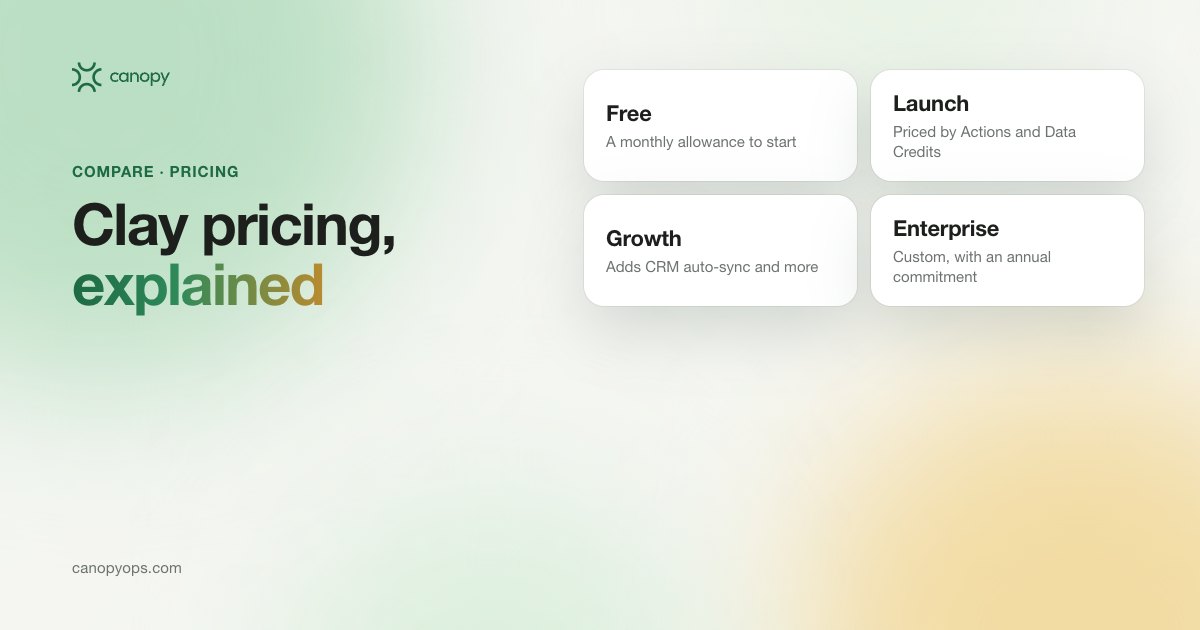
Clay pricing has four plans as of 4 November 2026: Free, Launch, Growth and Enterprise. Clay meters usage in two units, Actions for platform work and Data Credits for data and AI. Clay's pricing page lists Launch at $167/mo on the plan card and from $185/mo in its FAQ, and Enterprise is custom.
Key takeaways on Clay pricing and credits
- Clay sells four plans as of 4 November 2026 (Free, Launch, Growth and Enterprise), and the paid plans are priced by the Actions and Data Credits a team buys, as listed on Clay's pricing page.
- Clay's own pricing page shows two starting prices for Launch ($167/mo on the card, $185/mo in the FAQ) and two for Growth ($446/mo and $495/mo), so confirm the live figure before budgeting.
- Clay Actions reset every billing cycle and can't be topped up, while unused Data Credits roll over within limits that differ between monthly and annual plans.
- A team's total spend comes down to contact volume, enrichments per row, AI use, plan features and the hours someone spends building and maintaining tables.
How much does Clay cost? Plans and prices as of 4 November 2026
Clay publishes its prices at clay.com/pricing, and every figure on this page was checked there on 4 November 2026. The pricing page carries no "last updated" date. Clay describes itself on its homepage as infrastructure "to get any data, run agentic workflows, and launch GTM plays." Its plans meter that work in Actions, which "measure platform usage: enrichment & GTM execution," and Data Credits, which "buy data & AI from vendors in Clay's marketplace." A Monthly/Annual toggle says annual billing saves 10%. Free, Launch and Growth each offer a 14-day trial, and Clay says no credit card is needed to start free.
Last verified: 4 November 2026.
| Clay plan (checked 4 Nov 2026) | Price shown on clay.com/pricing | Actions a month | Data Credits a month | Data Credit rollover | Data Credit top-ups |
|---|---|---|---|---|---|
| Free | Free | 500 | 100 | None | None |
| Launch | "$167/mo" on the plan card; "starting at $185/mo" in the FAQ | 15,000 | 2,500 in the tier list and FAQ; "3K" on the plan card | Up to 1 month's credits / 15% of annual credits | 30% premium |
| Growth | "$446/mo" on the plan card; "starting at $495/mo" in the FAQ | 40,000 | 6,000 | Up to 1 month's credits / 15% of annual credits | 30% premium |
| Enterprise | Custom, through "Get a demo" | Custom (FAQ: 200,000+; help doc: 100,000+) | Custom (FAQ: 100,000+) | Custom | Custom price |
What the Clay Free plan includes
Clay's Free plan includes unlimited seats and tables, up to 200 rows per table, multi-provider waterfalls, Claygent and bring-your-own API keys, as of 4 November 2026. Free has no rollover and no top-ups, and phone number enrichment isn't available on it.
What Clay's Launch and Growth plans add
Launch is pitched "for small teams building and automating prospecting workflows." Clay's comparison table says Launch adds phone number enrichment, job change, company news and social listening signals, email campaigns, custom functions and scheduled enrichment runs. Growth, marked "Recommended," adds CRM integrations with auto-sync, data warehouse connections, HTTP API integrations, webhooks, web intent signals, unlimited ad audiences, domain and inbox purchase for the Clay Sequencer, and priority support. Every plan includes a credit reporting dashboard, and annual plans get all credits up front.
What Clay Enterprise includes
Clay Enterprise has no published price as of 4 November 2026: the FAQ calls it "custom pricing with annual commitment," and Actions, Data Credits, rollover and top-up prices are all custom. Features listed only on Enterprise include SSO/SAML, SCIM provisioning, IP allowlists, role-based access control, user groups, credit budgeting, workflow and workbook limits, a dedicated growth strategist (CSM) and a 15-minute source sync, where other plans sync daily.
Where Clay's pricing page and docs give two different figures
Clay's pricing page and help docs show two different figures for the same item in six places as of 4 November 2026. The table shows both figures in each pair and where each appears, without choosing between them. Clay's page doesn't say in words which billing option the plan card prices reflect, so confirm the live number on clay.com/pricing or with Clay before budgeting.
| What differs (checked 4 Nov 2026) | One figure, and where it appears | The other figure, and where it appears |
|---|---|---|
| Launch starting price | "$167/mo" on the Launch plan card | "starting at $185/mo" in the pricing FAQ |
| Growth starting price | "$446/mo" on the Growth plan card | "starting at $495/mo" in the pricing FAQ |
| Launch Data Credits a month | "3K data credits/mo" on the Launch plan card | 2.5K (2,500) in the Launch tier list and the FAQ |
| Enterprise Actions a month | 200,000+ in the pricing FAQ | 100,000+ in Clay's Actions & Data Credits help doc |
| 120K-a-year Data Credit tier, annual billing | $414/mo in the Launch tier list | $413/mo in the Growth tier list |
| Data Credit rollover | Pricing FAQ: up to 2x the monthly limit, without naming a billing option | Help doc: 2x applies to monthly plans, and annual plans get a 15% rollover on renewal |
What are Clay Actions and Data Credits?
Clay Actions pay for work done on the platform, and Data Credits pay for the data and AI Clay buys from marketplace vendors. Clay's Actions and Data Credits help doc says each Action "costs a few tenths of a penny" and each Data Credit "costs a few pennies," and the pricing FAQ says Data Credits "start at $0.05 each" and Actions at less than $0.01 each. An enrichment uses one Action plus whatever Data Credits its data type costs. Two rules change that count. If an enrichment returns no result, Clay charges neither unit. With your own API key, each run still counts as one Action but uses no Data Credit, and the provider bills you directly.
What uses a Clay Action and what doesn't
Pulling data into Clay and working with it inside a table uses no Actions, according to Clay's help doc. Enriching, sending and exporting do.
| Uses an Action (Clay help doc, 4 Nov 2026) | Does not use an Action |
|---|---|
| Each enrichment from any provider | Sourcing lists of accounts or contacts |
| Runs that use your own API keys | CRM imports |
| GTM execution, such as sending emails or posting to Slack | Data warehouse imports |
| 1 Action per lead added to a campaign (not per email sent) | Formulas and filters |
| 1 Action per record exported to an external sequencer | Creating audiences (only the export counts) |
| CRM exports and syncs | Send Table Data |
| Data warehouse exports and syncs | Lookup Single Row in Other Table |
| Ads audience exports, and work reps trigger through MCP |
How many Data Credits does a Clay enrichment use?
A single Clay enrichment costs from 0.5 to more than 10 Data Credits depending on the data type, and Clay's help doc says a fully enriched record "typically costs 6 to 20 Data Credits." In Clay's words, "emails are cheap, phone numbers are expensive," and own API keys and waterfalls also change the count. Clay shows the exact cost next to each enrichment in the product and publishes no per-provider credit table in these docs. Its own worked example, for 100 contacts, counts Data Credits only:
| Step in Clay's worked example (100 contacts) | Data Credits, as Clay states them |
|---|---|
| Find 100 people in Clay's database | 0 |
| Enrich LinkedIn profiles (0.5 per profile) | 50 |
| Find emails at 90% success (0.5 per email x 90) | 45 |
| Validate emails (select validator providers are free under new pricing) | 0 |
| Total | 95, or 50 with your own email API key |
Clay Action and Data Credit tiers: annual vs monthly prices
On Launch and Growth, Clay lists separate price tiers for Actions and for Data Credits, each with an annual and a monthly price, as of 4 November 2026. Annual prices are shown per month, and Clay's Launch card says "expand anytime." Data Credit tier prices match across the two plans except at the 120K-a-year tier.
| Clay Actions tier (checked 4 Nov 2026) | Launch, annual | Launch, monthly | Growth, annual | Growth, monthly |
|---|---|---|---|---|
| 15K a month (180K a year) | $54/mo | $60/mo | Not offered | Not offered |
| 40K a month (480K a year) | $135/mo | $150/mo | $185/mo | $205/mo |
| 60K a month (720K a year) | $180/mo | $200/mo | $261/mo | $290/mo |
| 100K a month (1.2M a year) | $261/mo | $290/mo | $405/mo | $450/mo |
| 200K a month (2.4M a year) | $486/mo | $540/mo | $765/mo | $850/mo |
| Clay Data Credits tier (checked 4 Nov 2026) | Launch, annual | Launch, monthly | Growth, annual | Growth, monthly |
|---|---|---|---|---|
| 2.5K a month (30K a year) | $113/mo | $125/mo | Not offered | Not offered |
| 6K a month (72K a year) | $261/mo | $290/mo | $261/mo | $290/mo |
| 10K a month (120K a year) | $414/mo | $460/mo | $413/mo | $460/mo |
| 20K a month (240K a year) | $792/mo | $880/mo | $792/mo | $880/mo |
| 50K a month (600K a year) | $1,913/mo | $2,125/mo | $1,913/mo | $2,125/mo |
Do Clay credits roll over, and can you top up?
Clay rollover rules for Actions and Data Credits
Clay Actions never roll over: "Actions reset each billing cycle and don't roll over." Data Credits do, within limits set by billing. Clay's help doc says unused Data Credits on a monthly plan accumulate up to 2x the plan's monthly credit limit, and an annual plan is eligible for a 15% Data Credit rollover on renewal at the same or a higher tier. Enterprise rollover is custom; the FAQ puts it at up to 15% of the prior year's purchased credits on renewal at equal or higher commitment. Free has no rollover. Downgrades use the same cap: after the billing cycle ends, the balance is capped at 2x the new plan's monthly limit, and a full cancellation moves the workspace to a free plan. Clay recommends downgrading rather than cancelling to preserve data.
How Clay top-ups work
Clay top-ups add Data Credits only. Launch and Growth can "Buy more at a 30% premium" (50% on legacy plans), and a team short on Actions moves up an Action tier instead. Clay's help doc sets a 250-credit minimum per top-up and lets one-time and automatic top-ups together add up to 4x the monthly Data Credit allocation. Each top-up is capped at $1,000, with a $5,000 maximum across top-ups in any rolling 7-day window. Automatic top-ups are open to workspace admins on paid self-serve plans, which leaves out Free, Trial and Enterprise. Clay says upgrading the Data Credit tier is more cost-effective than topping up for regular needs.
How Clay prices AI models and web research
Clay charges for AI in Data Credits under two schemes, according to its AI pricing doc. Fixed pricing charges a flat number of credits per task and covers 80% of models, including all of Clay's own. Variable pricing covers the other 20%, the most advanced reasoning models, at actual token cost with 0% markup: Credit Charge = Actual LLM Cost ($) / Workspace Cost Per Credit ($). Clay withholds an estimate set at the 75th percentile of past runs, then refunds or deducts the difference, and says 75% of runs cost less than the tilde estimate shown. Every AI prompt also counts as one Action. Auto mode, the default for new web research columns, is variable-priced. Rates change often; the sample below is from 4 November 2026.
| Model in Clay (4 Nov 2026) | Content generation, Data Credits | Web research, Data Credits |
|---|---|---|
| Clay Helium | Not listed in this sample | 1 |
| Clay Argon | Not listed in this sample | 3 |
| GPT-5 Nano | 0.2 | 0.5 |
| GPT-5 Mini | 0.4 | 1 |
| GPT-4o | 1 | Variable |
| GPT-5.1 | 2 | Variable |
| o3 | 5 | Variable |
| Gemini 2.5 Flash | 0.5 | 1 |
| Gemini 2.5 Pro | 3 | Variable |
What changed in Clay pricing in 2026
Clay's current plans replaced the legacy Starter, Explorer and Pro plans in Spring 2026, according to a 16 September 2026 Clay blog post by Zona Zhang and Mary Katherine Hanley. Clay opened five newer features to legacy plans through 31 December 2026, listed below; after that, legacy customers can migrate to Launch, Growth or Enterprise or stay on a legacy plan indefinitely. The same post says fewer than 5% of customers on modern plans reach their usage capacity, and the pricing FAQ says Launch and Growth are scoped so that 90% of Clay's customers never hit a usage limit. Both figures are Clay's own claims. Other dates below come from Clay's changelog.
| Date | Change to Clay pricing or credits (Clay's own account) |
|---|---|
| Spring 2026 | Current plans introduced, replacing legacy Starter, Explorer and Pro plans |
| Week of 24 Aug 2026 | Prorated refunds for plan upgrades: credit for unused credits and actions when upgrading mid-cycle |
| Week of 14 Sep 2026 | Auto Top-Ups |
| 16 Sep 2026 | Audiences, Account Agents, Workflows, the Clay Plugin and Sequencer on Audiences opened to legacy plans |
| Week of 26 Oct 2026 (posted 2 Nov 2026) | Workflow Credit Limits, in beta |
| 31 Dec 2026 | Legacy-plan access to those features ends |
What drives a GTM team's total Clay spend
A team's Clay bill starts at the plan price and then depends on how its tables are built. Clay publishes no fixed per-row cost beyond the ranges and the worked example above, so each driver below is a question to answer with your own numbers before picking a tier.
Contact volume and Clay's own sizing guidance
Volume sets the tier. Clay's help doc sizes Launch's 15,000 Actions a month for "Enriching ~10,000 records/year," Growth's 40,000 for about 50,000 records a year, and Enterprise's 100,000+ for millions. On Data Credits, the doc places Launch at 2,500 to 10,000 a month for about 1,000 records a month, Growth at 6,000 to 100,000 for 1,000 to 10,000 records, and Enterprise at 100,000+ for more than 10,000. A team that knows how many accounts and contacts it adds each month can place itself on that ladder before a sales call. Count re-enrichment as well, because a refreshed list runs through the same paid steps again.
Enrichments per row in a Clay table
Every Clay column that calls a provider adds cost to each row it runs on, in both units. Clay's worked example adds LinkedIn profiles and emails to 100 contacts for 95 Data Credits, while its doc puts a fully enriched record at 6 to 20, and the difference comes from how many enrichments run per row and which data types they fetch. Clay's own advice: narrow the dataset before enriching, enrich only when a field is empty or stale, and connect provider keys a team already pays for. Clay says connecting your own keys saves 50 to 80% on Data Credits, a figure that is Clay's own claim.
AI columns and web research in Clay
AI use is the least predictable line on a Clay bill. Every AI prompt costs one Action plus Data Credits, and variable-priced models, including the default Auto mode for web research, settle the final charge after the run. Running new workflows on 10 to 20 records first, as Clay recommends, shows the per-row AI cost before a full list runs.
Plan features and seats on Clay
For some teams, a Clay feature decides the plan before volume does. A team that needs CRM auto-sync, a data warehouse connection, webhooks or web intent signals needs Growth as of 4 November 2026, whatever its record count, and SSO/SAML, SCIM provisioning and credit budgeting sit on Enterprise. Clay's Free plan lists unlimited seats, and the Launch and Growth prices Clay lists are for Action and Data Credit tiers, so confirm seat terms for a paid plan with Clay.
The people who build and maintain Clay tables
A Clay subscription is one part of the cost. Someone has to design each table, choose providers, write the AI prompts, test on a sample, fix columns when a provider's output changes and keep CRM syncs clean, and Clay's pricing page doesn't price that time. When I size any usage-priced data tool, I put the hours of the person who runs it next to the plan price, because the plan doesn't run itself. The same discipline applies as baselining the KPIs before buying tools: write down which number the spend should move. Teams weighing a self-built research stack against an AI SDR can compare the work each leaves for people in the guide to AI SDRs.
An option for teams that want researched outreach run for them
Some teams want the outcome of the data work, researched and verified outreach, without running it themselves. Canopy appears here as one option for those teams. Canopy's agentic revenue system takes a different route: research and verified contact data are part of the service. AI sales agents research every account, cite a source and a retrieval date for every fact, and check every address before anything is sent.
With Canopy, nobody on your team builds tables. GTM Engineers set the ICP, the signals and the exclusion rules, and every list is screened against your CRM before any research starts. Drafts in Canopy Outbound wait for a person to approve them until you choose otherwise, under send modes you control, and a pod of GTM Engineers runs the system with your team, as set out in how a Canopy deployment works.
Common questions about Clay pricing
How much does Clay cost per month?
Clay has four plans as of 4 November 2026, with usage metered in Actions and Data Credits: Free costs nothing, Enterprise is custom, and Launch and Growth show two starting prices each on Clay's pricing page. The Launch plan card shows $167/mo while the FAQ says Launch starts at $185/mo. Growth shows $446/mo on its card and $495/mo in the FAQ. Confirm the current figure on clay.com/pricing before budgeting.
Is Clay free to use?
Yes, Clay has a Free plan with 500 Actions and 100 Data Credits a month as of 4 November 2026, unlimited seats and tables, and up to 200 rows per table. Free includes Claygent, multi-provider waterfalls and bring-your-own API keys, but no phone number enrichment, rollover or top-ups. Free, Launch and Growth each offer a 14-day trial, and Clay says no credit card is needed to start.
What is the difference between Clay Actions and Data Credits?
Clay Actions measure platform usage, such as running an enrichment, exporting to a CRM or adding a lead to a campaign, while Data Credits pay for data and AI bought from vendors in Clay's marketplace. As of 4 November 2026, Clay says Actions start at less than $0.01 each and Data Credits at $0.05 each. Actions reset every billing cycle, and Data Credits can roll over within limits.
Does Clay charge when an enrichment finds nothing?
No. Clay's pricing FAQ says that if an enrichment returns no result, the workspace is not charged Data Credits or Actions. The rule matters most for email and phone lookups, where some rows come back empty. Clay's own worked example finds emails for 100 contacts at a 90% success rate and counts Data Credits only for the 90 emails found.
Do unused Clay credits roll over to the next month?
Unused Clay Data Credits roll over within limits, and Actions never do. Clay's help doc says monthly plans accumulate unused Data Credits up to 2x the plan's monthly limit, while annual plans are eligible for a 15% rollover on renewal at the same or a higher tier. Enterprise rollover is custom, and Free has none. Clay's pricing FAQ states the 2x rule without naming a billing option.
Can I buy more Clay credits mid-month?
Yes, on Launch and Growth you can top up Data Credits at a 30% premium as of 4 November 2026, but Actions can't be topped up. Each top-up has a 250-credit minimum and a $1,000 cap, with a $5,000 limit across top-ups in any rolling 7-day window. Clay says moving to a higher Data Credit tier is more cost-effective than topping up for regular needs.
Is Clay cheaper on annual billing?
Yes. Clay's pricing toggle says annual billing saves 10%, and each tier lists a lower per-month price on annual billing. Launch's lowest Actions tier, for example, shows $54/mo on annual and $60/mo on monthly as of 4 November 2026. Annual plans also get all credits up front, and their Data Credit rollover works differently: 15% on renewal at the same or a higher tier.
How many Data Credits does it take to enrich one contact in Clay?
Clay's help doc says a fully enriched record typically costs 6 to 20 Data Credits, and a single enrichment ranges from 0.5 to more than 10 credits depending on the data type. Emails are cheap and phone numbers are expensive, in Clay's words. Clay's worked example uses 95 Data Credits to add LinkedIn profiles and emails to 100 contacts, or 50 with your own email API key.
Does connecting your own API keys lower Clay costs?
Connecting your own API keys removes the Data Credit charge for that provider, but each run still counts as one Clay Action, and the provider bills you directly. Clay says own keys can save 50 to 80% on Data Credits. That figure is Clay's claim, and the real saving depends on what the provider charges you outside Clay.
What happens to legacy Clay plans after 31 December 2026?
After 31 December 2026, legacy Clay plans (Starter, Explorer and Pro) lose access to Audiences, Account Agents, Workflows, the Clay Plugin and Sequencer on Audiences, which Clay opened to them on 16 September 2026. Clay says legacy customers can migrate to Launch, Growth or Enterprise, or stay on a legacy plan indefinitely. Top-ups on legacy plans carry a 50% premium.
How much does Clay Enterprise cost?
Clay doesn't publish an Enterprise price. As of 4 November 2026 the plan shows "Custom" and is sold through a demo, with an annual commitment. Clay's Enterprise volume figures differ by page: the pricing FAQ lists 100,000+ Data Credits and 200,000+ Actions a month, and the help doc lists 100,000+ Actions. Enterprise adds SSO/SAML, SCIM provisioning, credit budgeting and a dedicated growth strategist.
Does Clay charge for every email sent in a campaign?
No. Clay's help doc counts "1 Action per lead added to campaign (not per email sent)." Exporting to an external sequencer costs 1 Action per record, and CRM and data warehouse exports also use Actions. Sourcing the list in the first place, and CRM or warehouse imports, use no Actions, according to the same doc checked on 4 November 2026.
Written by John Miraglia, Co-Founder of Canopy, who leads product and platform. John built and exited a B2B SaaS company by automating every step of the pipeline instead of hiring more reps. Last updated: November 2026.
If your team wants researched, verified outreach built and run for you, with people approving the work and a team that owns the results, apply to become a launch partner.
Canopy
See how Canopy puts this to work on top of HubSpot, with your team approving what sends.