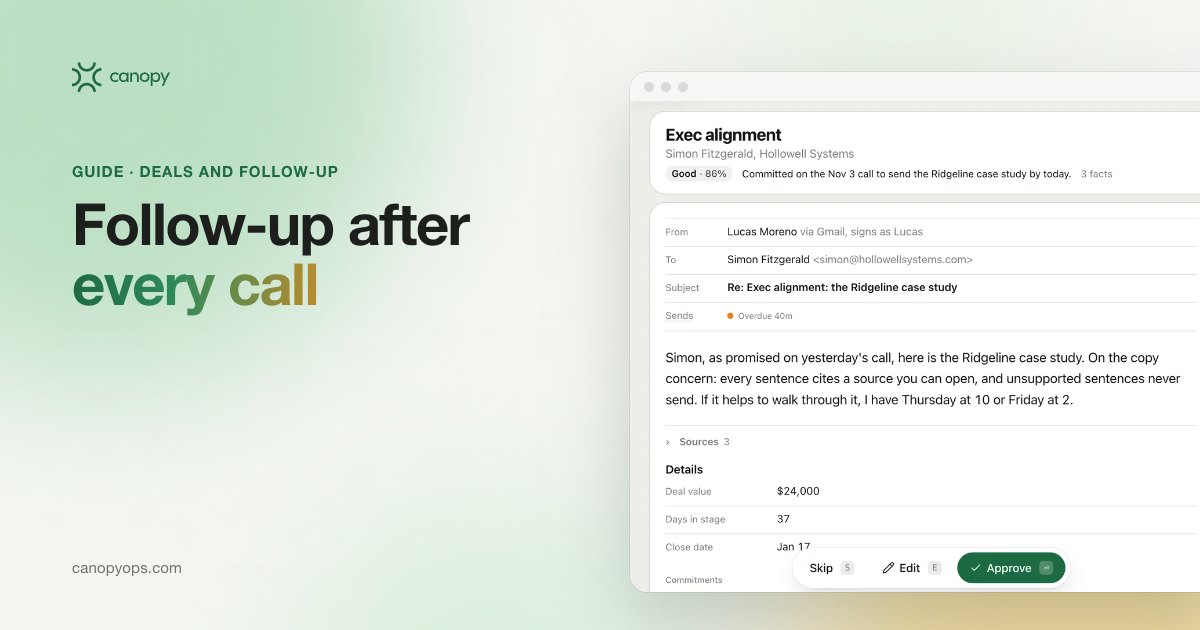
AI sales follow-up is the work an agent does after a sales call: it reads the call notes or transcript, pulls out commitments, objections and next steps, and drafts the recap. In Canopy's Deals workspace, the rep edits and approves every follow-up before it sends, and the next touch is queued for the date committed on the call.
Key takeaways on AI sales follow-up
- AI sales follow-up turns a finished call into a drafted follow-up email plus the commitments, objections and next steps from the conversation, so the rep reviews work instead of starting from a blank page.
- Canopy's Deals workspace is locked to Approve to send because open opportunities are too important for any agent to contact a buyer on its own.
- The timing of a good follow-up comes from the call itself: the date the buyer agreed to and the asset they asked for.
- No public study measures post-call follow-up well, so teams should track follow-up speed, next step coverage, stage conversion and win rate against their own trailing baseline.
What sales follow-up after a call has to do
Sales follow-up after a call carries four jobs. The recap tells the buyer what you heard, in their words, so they can correct it. The promised asset (the security questionnaire, the pricing one-pager, the case study the CFO asked for) has to arrive while the request is fresh. The next step needs a date and an owner on both sides. And the CRM has to show what was said, so the pipeline and the forecast match the conversation. Most reps do all four by hand after the last call of the day, so the follow-up gets written at 9pm or not at all.
Sellers have little spare time for post-call admin. Salesforce's 2026 State of Sales report, a survey of 4,050 sales professionals, found the average seller spends 40% of their time selling. The same survey found sellers expect fully deployed AI agents to cut email drafting time by 36%. That figure is an expectation, and Salesforce sells AI agents, so read it as a vendor survey. Of the jobs AI in sales can take on, post-call follow-up is the drafting work closest to revenue, because every one of those emails goes to a buyer with an open opportunity.
Why deal follow-up slips
Deal follow-up slips when the next step is never written down. Ebsta's 2024 B2B Sales Benchmarks, built with Pavilion on 4.2 million opportunities across 530 companies, found top performers were 412% more likely to have a next step or meeting defined. Ebsta is a sales analytics vendor, and the figure is relative. The same report found reps attributed 61% of all lost deals to "indecision". Ebsta's 2025 GTM Benchmarks digest adds that 36% of deals slipped, and win rates fall the longer a deal slips. A dated next step is the cheapest defense against indecision, and the follow-up email is where that next step gets written down and agreed. When the recap goes out two days late, the date the two sides discussed starts to read as a suggestion.
What research measures about follow-up, and what it misses
Public research on follow-up after a sales call is thin. I have not found a primary study that measures how quickly reps send a recap after a call, or how often they send one at all. Most published follow-up figures come from cold outreach, sent to people who never asked to hear from you. A buyer who has just been on a call with your rep knows the rep and has often asked for something specific. Until someone publishes a study of post-call follow-up, advice on its timing and cadence rests on practice, and the most useful benchmark is your own team's trailing baseline.
How an AI agent drafts the follow-up after a sales call
An AI follow-up agent, one kind of AI sales agent, runs five steps between the end of a call and the next touch, and the rep owns one of them: approval. In Canopy's Deals workspace, the agent captures the call, extracts what matters, drafts the follow-up, waits for the rep, then queues the next touch for the date agreed on the call.
| Step | What the agent does | What the rep does | Where the result sits |
|---|---|---|---|
| 1. Capture | Reads the call recording, transcript or notes | Runs the call as usual | The call, linked to the deal |
| 2. Extract | Pulls out commitments, objections and next steps | Nothing yet | A call summary on the deal in Canopy |
| 3. Draft | Writes the recap and next step to the team's voice rules, answering any objection raised | Nothing yet | A follow-up draft waiting on the deal |
| 4. Approve | Holds the draft | Edits, approves and sends | The sent email, logged to the deal in the CRM |
| 5. Advance | Queues the next touch for the date committed on the call | Moves the stage in the CRM if the call changed it | A follow-up queued for the committed date |
Capturing call notes and transcripts on the deal
Call capture is the input everything else depends on. Canopy Deals reads your call recordings, transcripts and notes, including calls already logged on the deal in HubSpot or Salesforce, and attaches them to the right deal as soon as the call ends. The Canopy integrations page lists the tools Canopy works with. If a call was never recorded, the agent has nothing to work from, and the rep writes that follow-up the old way.
Extracting commitments, objections and next steps from a call
Extraction turns a transcript into three lists a rep and a manager can use. Commitments come first: every promise made on the call, by your side and by the buyer's, each with who owns it and the date it is due. Objections are the concerns the buyer raised, such as a security review or a worry about switching tools, so the follow-up can answer them in writing. Next steps are what both sides agreed happens after the call. In my experience, a buyer who sees their own concern answered in writing finds it easier to forward the recap to the people who sign off.
Drafting the recap and next step for the rep
The draft is a follow-up email the rep would plausibly have written on a good day. Deals drafts follow your team's voice rules, checked on sample drafts before launch, and each one is built from the commitments, objections and next steps of that specific call. A good draft leads with what the buyer said, answers any objection, restates the agreed next step with its date, names what the rep promised to send and asks for a correction if anything is wrong. A draft waits on the deal within minutes of the call ending. Each week the Learnings workspace proposes changes based on which follow-up patterns buyers answer, and a person accepts each one before it shapes the next round of drafts. Nothing in a Deals follow-up goes out before the rep approves it.
Keeping the deal current and timing the next touch
Keeping the deal current is the part of AI sales follow-up that protects the forecast. Each call's summary, commitments and next steps sit on the deal in Canopy, beside the drafted follow-up, and the sent email is logged to the deal in HubSpot or Salesforce. A stage change happens in your CRM: when a call moves a deal forward, one click opens the deal there so the rep can update it. The next touch is queued from the date committed on the call. If the rep promised revised pricing by Thursday, a follow-up is queued for Thursday, with the commitment and the call it came from shown beside the draft. Sales managers then review a pipeline whose next steps match what buyers said, instead of a pipeline updated the night before a forecast call.
Why AI follow-up on open deals stays on Approve to send
Canopy Deals is locked to Approve to send because open opportunities are too important for any agent to contact a buyer on its own. Canopy has three send modes: Draft only, Approve to send and Automatic. Other workspaces can earn Automatic over time. Deals cannot. The rep owns every word that goes to a buyer with an open opportunity, and the Canopy agent control settings show Deals locked to Approve to send. I designed it that way because a follow-up on a live deal can carry pricing, a contractual promise, a delivery date or a tone call that only the rep who ran the call can make. Other vendors leave the choice to the customer. Salesforce's AI sales agent page says reps can let the agent update the pipeline on its own or use a "suggestive" mode where they review and approve.
| Canopy workspace | Default send mode | Who decides what sends |
|---|---|---|
| Outbound | Approve to send | The team, until it chooses otherwise |
| Lifecycle | Approve to send or Automatic | The team, inside the offers and voice rules it approved |
| Deals | Approve to send, locked | The rep, on every follow-up |
| Customers | Draft only | The CSM, on whether and when to send |
Approval only works if the reviewer can see what they are approving. Gartner predicted in a July 2026 press release that by 2028 AI agents will outnumber sellers 10 to 1, yet fewer than 40% of sellers will say agents improved their productivity. My read is that agents which add review work without saving the rep time explain much of that gap. Canopy shows each draft as a full preview with the evidence behind it and a confidence score, so the rep can approve in a minute or rewrite a line, and every send is logged with the person who approved it.
What a rep should check before approving a follow-up
A rep approving an AI-drafted follow-up should check a short list before sending:
- The recap matches what the buyer said, including any number, date or name.
- Every promised asset is attached and is the current version.
- The next step has a date both sides agreed to.
- Nobody who should see the email is missing from it, and nobody is copied who shouldn't be.
- The tone fits how the call ended, which only the rep knows.
When to send a sales follow-up after a call
Send the recap the same day as the call, while the buyer still remembers the conversation and can correct it. Same-day recaps are a practitioner rule. No primary research I trust measures post-call timing. The later touches should follow the dates agreed on the call rather than a fixed cadence borrowed from cold outreach. A buyer who said they need two weeks to get security review done should hear from the rep when those two weeks are up, with the questionnaire answers ready. Canopy Deals opens each morning on the follow-ups due that day and the reason for each one, so the rep starts with the deals that have a date attached.
Following up after a no-show or a buyer who goes quiet
No-shows and silent buyers need a follow-up as much as good calls do, and not every company sends one. Of the companies in RevenueHero's 2024 lead response test that used a scheduler, 61% followed up after a booked meeting was a no-show. When a deal passes its stall threshold with no meeting booked, Canopy Deals drafts a nudge from the last call and the commitments still open, and the rep decides whether to send it. Each stage has its own threshold, from 10 to 18 days. When a deal does close lost, the Canopy Lifecycle workspace takes over, since one of its two jobs is recovering closed-lost deals with behavior-triggered email.
What an AI follow-up email after a sales call contains
A follow-up email after a sales call should be short and easy to correct. A useful one has five parts:
- A subject line that names the meeting and the buyer's company, so it is easy to find later.
- A recap of what the buyer said they need, in their words.
- The assets promised on the call, attached or linked.
- The next step, with an owner on each side and a date.
- One question that invites a correction or a reply.
Buyers forward follow-up emails to colleagues who were not on the call, so the recap has to make sense to a finance lead or an IT reviewer who never heard the pitch. A summary of the seller's slides gives that reader nothing to act on.
How to measure AI sales follow-up
AI sales follow-up should be measured on speed and on what happens to the deal afterward. Canopy measures the Deals workspace on four numbers, plus one hygiene check worth adding. No public benchmark exists for most of them, so the useful comparison is your own team before and after. The Canopy guide to KPIs to baseline before buying tools covers how to set that baseline.
| Metric | Definition | Compare against |
|---|---|---|
| Follow-up speed | Time from call end to follow-up email sent | Your own trailing 90 days |
| Next step coverage | Share of open deals with a dated next step | Your own trailing 90 days |
| Stage conversion | Share of deals moving from one stage to the next | The same stage, prior quarters |
| Win rate | Closed won over all closed deals | Prior quarters, same segment |
| Sales cycle | Days from deal open to close | Prior quarters, same segment |
Where AI sales follow-up stops
An AI follow-up agent is only as good as the call record it reads. If the call was not recorded, or the important part happened in a hallway afterward, the draft will miss it and the rep has to add it. Agents also should not decide commercial terms: discounts, contract changes and anything that commits the company stay with the rep and their manager. Each client runs on a private Canopy instance, covered on the Canopy security page. Managers see coaching patterns across the team, and each rep can filter the pipeline to their own deals. The agent writes the first version, and the rep makes the calls that need judgment about the person on the other side.
How Canopy runs follow-up for a sales team
Canopy runs AI sales follow-up as the Deals workspace of an agentic revenue system. We unify your systems, build an agent layer on top, and make it the master platform for everything in your CRM. Our team runs it with you, and we own the results. HubSpot or Salesforce stays the source of truth. Canopy GTM Engineers connect the call recorder, map deal stages and fields, and set the voice rules drafts follow, checked on sample drafts before launch. On the sales rollout, week 1 connects the systems, weeks 2 to 3 tune drafts on real past calls, and week 4 puts follow-up drafts on every call. The wider Canopy deployment starts with a revenue workshop and runs a 30-day build and a 90-day adoption period with GTM Engineers in the weekly review. The Canopy page for sales teams shows the daily view, and the sales copilot page covers the Deals workspace in full. Canopy is built by the team behind Sprig and Stability AI.
Common questions about AI sales follow-up
What is AI sales follow-up?
AI sales follow-up is an agent reading a finished sales call and drafting what comes next: the recap, the dated next step and the commitments to track. In Canopy Deals, the rep then edits and approves the email before it sends, the call summary and commitments sit on the deal, and the next touch is queued for the date agreed on the call.
Can an AI agent send sales follow-up emails without the rep?
No. Canopy Deals cannot send a follow-up without the rep. The workspace is locked to Approve to send, so every follow-up on an open opportunity waits for the rep's approval. Some other tools offer a mode where the agent acts alone. Canopy keeps deals out of it because a follow-up on a live deal can carry pricing or promises that only the rep should decide.
How soon after a sales call should I send a follow-up?
Send the recap of a sales call the same day, while the buyer can still correct it. That advice comes from practice, since no primary study measures post-call timing. Later touches should follow the dates agreed on the call. Canopy Deals has a draft waiting within minutes of the call ending, so same-day follow-up costs the rep a review rather than an evening.
What should a follow-up email after a sales meeting include?
A follow-up email after a sales meeting should include a recap in the buyer's words, the assets promised on the call, the next step with an owner and a date on each side, and one question that invites a correction. Write the recap so a colleague who missed the call can follow it.
How many follow-ups does a deal need?
No reliable public figure exists for follow-ups on an open deal, and cold outreach benchmarks measure a different situation. On an active deal, the dates agreed with the buyer should set the number of touches, and a deal that passes its stall threshold gets a drafted nudge instead of a generic reminder.
Does Canopy Deals work with our call recordings?
Yes. Canopy Deals reads your call recordings, transcripts and notes, including calls already logged on the deal in HubSpot or Salesforce. The recording lands on the deal when the call ends, and the agent extracts commitments, objections and next steps from it before drafting the follow-up.
Does AI sales follow-up update HubSpot or Salesforce?
Canopy Deals logs each sent follow-up to the deal in HubSpot or Salesforce. The call summary, commitments and next steps sit on the deal in Canopy, beside the drafted email, and a stage change happens in your CRM, one click from the deal in Canopy. The CRM stays the source of truth, and Canopy runs as an agent layer on top of it.
Will AI-written follow-ups sound like a template?
Not if the voice rules are set well. Deals drafts follow your team's voice rules, checked on sample drafts before launch, and each one is built from the commitments and objections of that specific call. The rep can rewrite any line before approving, and Learnings proposes changes based on which follow-up patterns buyers answer, for a person to accept.
Where do call summaries and drafts live?
Call summaries, commitments and next steps live on the deal inside Canopy, beside the drafted follow-up, and each client runs on a private Canopy instance. The sent email is logged to the deal in your CRM. Managers see coaching patterns across the team, and each rep can filter the pipeline to their own deals.
How do you measure whether AI follow-up is working?
Measure follow-up speed from call end to email sent, the share of open deals with a dated next step, stage conversion, win rate and sales cycle length. Public benchmarks are scarce for these, so compare each one against your own team's trailing baseline from before the agent went live.
Written by John Miraglia, Co-Founder of Canopy, who leads product and platform. John built and exited a B2B SaaS company by automating every step of the pipeline instead of hiring more reps. Last updated: November 2026.
Canopy is opening its agentic revenue system to a small group of companies first. If your reps are writing follow-ups at 9pm, apply to become a launch partner.
Deals
See how Canopy puts this to work on top of HubSpot or Salesforce, with your team approving what sends.