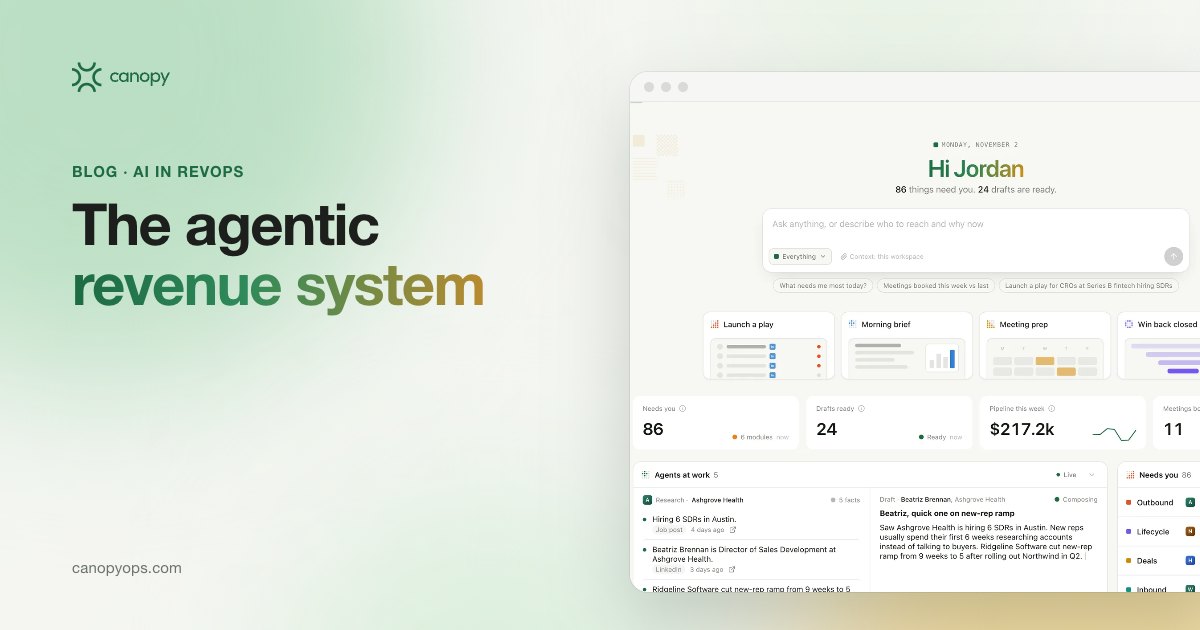
An agentic revenue system is a layer of AI agents on top of a company's own CRM, usually HubSpot or Salesforce, that does revenue work from first touch to renewal: prospecting, lifecycle email, deal follow-up and renewal prep. People approve what the agents send. Canopy builds one for each client, runs it with their team and owns the results.
Key takeaways on agentic revenue systems
- An agentic revenue system gives AI agents real jobs across the whole revenue cycle, from the first outbound touch to the renewal, on top of the CRM a company already runs.
- Canopy splits the work into four workspaces (Outbound, Lifecycle, Deals and Customers) plus Learnings, which tests new message versions against a holdout every week.
- Every Canopy deployment starts on Approve to send, and Deals follow-ups stay locked there, so a rep owns every word that reaches an open opportunity.
- HubSpot or Salesforce stays the source of truth, and every send, reply, booked meeting and lifecycle stage change is written back to the client's own CRM.
What is an agentic revenue system?
An agentic revenue system hands AI agents whole jobs in the revenue cycle and lets them carry each job through to a finished action. One agent in Canopy researches an account and writes the first touch. Another drafts the follow-up after a discovery call or flags an account whose product usage dropped. Each job ends in a draft or alert routed to the person who owns it, with the evidence attached. The word "agentic" describes that hand-off. A copilot waits for a person to start typing. An agent starts from a goal, pulls what it needs from the CRM and does the work inside limits the team sets.
The "system" half of the name means the agents share one account history. Every workspace on the Canopy platform reads the same records in HubSpot or Salesforce, so an objection a buyer raised on a sales call can change the next outbound brief, and a drop in product usage can shape the renewal plan. Point tools that each own one step see only their slice of the account.
How is an agentic revenue system different from agentic sales tools?
Agentic sales usually means agentic AI in sales: AI sales agents that prospect, qualify inbound leads or book meetings. An agentic revenue system takes the same idea across the full cycle: prospecting, lifecycle email, deal follow-up and renewal prep all run on one account history and one set of approval rules. For a revenue leader the practical difference is the hand-offs. A single-stage agent passes its output to a team that may or may not act on it. A revenue system keeps working the account until the next human decision, then puts that decision in front of the person who owns it. Canopy is built for teams that would otherwise buy AI sales agent software one stage at a time and wire the pieces together themselves.
Which jobs do AI agents do for revenue teams in Canopy?
Canopy groups the work into four workspaces, each opening on the decisions a person needs to make today. Learnings and Agent control sit underneath all four as the shared core.
Canopy Outbound: signal-based prospecting on Approve to send
Canopy Outbound finds accounts showing buying signals, such as hiring, funding or a change in their stack, screens them against the CRM and exclusion lists, researches each one and writes a personal first touch with every fact cited, the core of what an AI SDR does. Contact data is verified, and every address is checked before sending. Positive replies land in the rep's Inbox with the thread and a suggested response, ready to book. Outbound runs on Approve to send by default, so the rep reviews each draft and its evidence before anything goes out. We measure Outbound on reply rate, positive reply rate, meetings booked and pipeline. Open rate never counts for Outbound, because it says nothing about whether a buyer wants to talk.
Canopy Lifecycle: new pipeline from CRM history
Canopy Lifecycle sends behavior-triggered email from the client's own CRM and uses each contact's history to decide what they receive next, the approach our guide to B2B lifecycle marketing sets out. Lifecycle has two jobs. One is turning leads with no deal yet into new pipeline. The other is recovering closed-lost deals. Agents write inside the offers and voice rules the client's team approved, which keeps the brand intact even when a program runs on Automatic. The team picks Approve to send or Automatic for each program. Lifecycle reports open rate, click rate and click-to-open rate, then follows the same contacts through to meetings and pipeline.
Canopy Deals: follow-up drafts the rep always approves
Canopy Deals reads the call notes after every meeting and drafts the next step and the follow-up email for the rep (see our guide to AI sales follow-up). Each commitment made on the call is recorded with an owner and a due date, and a follow-up is queued for the day it falls due. Deals is locked to Approve to send. No agent contacts an open opportunity on its own, and the rep owns every word that goes out. We fixed that setting on purpose. A live deal carries context a model can miss, such as a side conversation about pricing or a champion who asked for quiet until a board meeting. Deals works from the team's own call recordings.
Canopy Customers: churn risk and renewal prep in Draft only
Canopy Customers brings product usage and health signals into the CRM and flags churn risk and expansion to the customer success manager (CSM) and account executive who own the account, as covered in our guide to AI for customer success. Agents also prepare renewal plans and QBR decks. Customers runs on Draft only by default: agents prepare the outreach, and the CSM decides whether and when to send it. Most usage signals reach the account owner within a day. Customers is measured on gross and net revenue retention and on expansion pipeline.
Canopy Learnings: a weekly test against a holdout
Canopy Learnings keeps the other four workspaces improving. Agents write new versions of a message, send them to matched groups alongside a holdout that keeps the current version, and measure both on the KPI that workspace owns. Each week Learnings proposes the winning version with its evidence, and one click from a person applies it. The team's voice rules and offers fix what a draft may say about pricing and proof, and new claims, offers and pricing always wait for a person. A change accepted by mistake can be rejected later in History.
| Workspace | What the agents do | Default send mode | Who approves | Measured on |
|---|---|---|---|---|
| Outbound | Signal-based prospecting, cited research, personal first touches, reply handling | Approve to send | The rep | Reply rate, positive reply rate, meetings booked, pipeline |
| Lifecycle | Behavior-triggered email that turns leads with no deal into pipeline and recovers closed-lost deals | Approve to send or Automatic | The marketing team, inside approved offers and voice rules | Open rate, click rate and click-to-open rate, meetings, pipeline |
| Deals | Reads call notes, drafts the next step and the follow-up | Approve to send, locked | The rep, every time | Follow-up speed, stage conversion, win rate, sales cycle |
| Customers | Usage and health signals, churn and expansion alerts, renewal prep | Draft only | The CSM decides whether and when to send | Gross and net revenue retention, expansion pipeline, renewals at risk |
| Learnings | Tests message versions against a holdout and proposes the winners weekly | Changes apply when a person accepts them | A person on the client's team accepts each change; GTM Engineers review the weekly brief | Lift against the holdout on each workspace's KPI |
How do send modes and approvals work in Canopy?
Canopy has three send modes, set per workspace in Agent control, and every change of mode is logged with who made it and when. In Draft only, agents research and write, and nothing leaves until a person sends it. In Approve to send, each message arrives as a full preview with the evidence behind every claim and a confidence score, and one click sends it. In Automatic, agents send and log on their own and flag exceptions to the account owner. Every deployment starts on Approve to send, and every send stays approved until the client chooses otherwise. A workspace earns Automatic once its results justify it, and low-confidence drafts are still held for a person.
Approval design is where I think most AI products go wrong. A yes or no button gets rubber-stamped once the queue is long enough. Canopy shows the reviewer the exact rendered message, recipient, sender and send time, plus where each fact came from, and bulk approval unlocks only after at least one item in the batch has been opened. Every approval has a 30-second undo window. Any play or lane can be paused, and a kill switch stops every automatic campaign at once. Canopy Agent control is where a team sets all of this and sees who approved what, and when.
Why does Canopy keep the client's CRM as the source of truth?
Canopy runs as an agent layer on the CRM a client already owns, and HubSpot or Salesforce stays the system of record. Every send, reply, booked meeting and lifecycle stage change the agents produce is written back to the CRM, so reporting, attribution and history stay where the revenue operations team already looks. Nobody migrates data, and reps have no second database to update. Each client runs on a private instance with isolated credentials. Canopy works alongside the tools a team already pays for, from call recordings to the team's chat, through Canopy integrations. Canopy's own description fits in two sentences: "We unify your systems, build an agent layer on top, and make it the master platform for everything in your CRM. Our team runs it with you, and we own the results."
How does Canopy deploy an agentic revenue system?
Canopy follows the same deployment path for every client, starting with a revenue workshop and putting the first workspace live inside 30 days.
| Phase | When | What happens |
|---|---|---|
| Revenue workshop | Week 0 | The client's team maps how revenue moves today and picks the first workspace, usually wherever the biggest leak is. |
| Build | Days 1 to 30 | A private instance is set up on the client's CRM, agents get the team's voice rules, offers and objections, checked on sample drafts, and baseline KPIs are recorded before the first send. |
| Adoption | Days 30 to 120 | A 90-day adoption period with GTM Engineers in the weekly review and monthly sprints that ship new plays. |
| Quarterly waves | Every quarter after | The next workspace goes live, reusing what the system already learned about the accounts. |
Canopy's team works as a small pod. A GTM Engineer sets up the instance and builds the agents. A revenue strategist sets plays, baselines and targets with the client and runs the weekly review. Jon Farrar or I stay in the strategy of every deployment. The pod reports weekly against the baseline agreed before the first send.
Why we built an agentic revenue system
Why hasn't AI spending reached revenue yet?
Most companies have bought AI and still can't point to a return in revenue. McKinsey's State of AI in 2026 survey of 1,719 participants found only 37% saying AI had contributed positively to EBIT, about the same as in 2025. In Salesforce's 2026 State of Sales survey, a vendor study of 4,050 sales professionals, 51% of sales leaders with AI said disconnected systems were slowing their AI initiatives. My read, and the argument of our guide to AI in sales, is that the gap sits in execution. Somebody has to own the work between the insight and the revenue: the follow-up after the call, the lead who asked for pricing and never heard back, the deal that went quiet, the renewal nobody chased.
Why do agents have to finish the work?
Doing beats showing. Revenue tools are good at telling a team what is slipping, like the deal with no next step or the account whose usage fell. Another dashboard doesn't close a deal. We built Canopy so the follow-up actually happens, drafted and waiting for approval while the context is fresh. Before Canopy, I built and exited a B2B SaaS company by automating every step of its pipeline instead of hiring more reps. Canopy carries the same bet into sales, marketing and customer success at once.
Why does someone have to own the results?
Revenue software with nobody accountable for adoption tends to stall once onboarding ends. Canopy is built and run for you. Our GTM Engineers build the instance, sit in the weekly review, ship improvements every sprint and report against the baseline. Agents do the work, people approve it, and the pod answers for the numbers. We own the results, and a vendor that shares the risk has to deliver. Every send is also a test, and each week the system proposes what won and tells the team why in a weekly brief.
Common questions about agentic revenue systems
What does an agentic revenue system actually do?
An agentic revenue system runs AI agents across the whole revenue cycle, from the first outbound touch through lifecycle email and deal follow-up to the renewal, on top of the CRM the company already owns. The agents research, write, classify and flag, and people approve what goes out. Canopy builds a private instance for each client, runs it alongside the client's team and owns the results.
Is an agentic revenue system the same as agentic sales?
An agentic revenue system covers more ground than agentic sales. Agentic sales usually means agents working one stage, such as prospecting or inbound qualification. An agentic revenue system connects outbound, lifecycle marketing, deal follow-up and customer success on one account history, so context from a sales call or a usage drop reaches whichever team needs it next.
Does Canopy replace our CRM?
Canopy does not replace the CRM. HubSpot or Salesforce stays the system of record, and Canopy works as an agent layer on top of it. Every send, reply, booked meeting and lifecycle stage change is written back to the CRM, so reporting and attribution stay where the team already works, and there is no migration.
Do Canopy's agents send emails without anyone approving them?
Canopy's agents send nothing without approval until the client chooses otherwise. Every deployment starts on Approve to send. Deals follow-ups always stay there, and Customers runs on Draft only by default. A workspace moves to Automatic only where results justify it, and even then low-confidence drafts are held for a person.
Which Canopy workspace should a team start with?
Most teams start with whichever workspace fixes their biggest leak, and that is usually Outbound or Lifecycle. The choice is made with the client's team in the revenue workshop at week 0. Deals and Customers typically follow in later quarterly waves, each one reusing what the system has already learned about the accounts.
How long does it take to deploy Canopy?
Canopy puts the first workspace live within 30 days of the revenue workshop. A 90-day adoption period follows, from day 30 to day 120, with GTM Engineers in the weekly review and monthly sprints that ship new plays. After adoption, quarterly waves add the next workspace at the team's pace.
Who runs Canopy day to day?
A Canopy pod runs the system with the client's team. A GTM Engineer sets up the instance and builds the agents, a revenue strategist runs the weekly review and drives adoption, and a founder stays in the strategy of every deployment. The client's reps, marketers and CSMs review and approve what the agents draft.
How does Canopy keep client data separate?
Canopy gives every client a private instance with isolated credentials, and every agent action is logged with who approved it. Any change the agents make to messaging can be rejected later, and the drafts revert. A play or lane can be paused at any time, and a kill switch stops every automatic campaign at once. Every agent action, including who approved each send, can be downloaded as CSV for compliance or review.
Who can apply to become a Canopy launch partner?
Canopy's launch partners are revenue teams that run HubSpot or Salesforce, have SDRs, AEs, marketers or CSMs to put agents to work for, and have a revenue leader who will own the deployment and join the weekly review. Partners want their first workspace live within 30 days and agree baseline KPIs with Canopy before the first send.
Written by John Miraglia, Co-Founder of Canopy, who leads product and the platform. John built and exited a B2B SaaS company by automating every step of the pipeline instead of hiring more reps. Last updated: November 2026.
Canopy is onboarding a small group of revenue teams before general availability, with a founder on every deployment. If your CRM is HubSpot or Salesforce and a revenue leader is ready to own the rollout, apply to become a launch partner.

Put agents to work on your revenue.
We're bringing on a small group of revenue teams before general availability.